Step 1
Pick an environment
Start from a tested template, like a Node app, a Linux shell, a Kubernetes cluster or a Python workspace for agents.
Students open a real environment right in your lesson, ready in about a second. You charge on your own checkout, and we take no cut.
Your video and a real lab sit in the same lesson, with your brand on both.
LabAdd a health check to your API
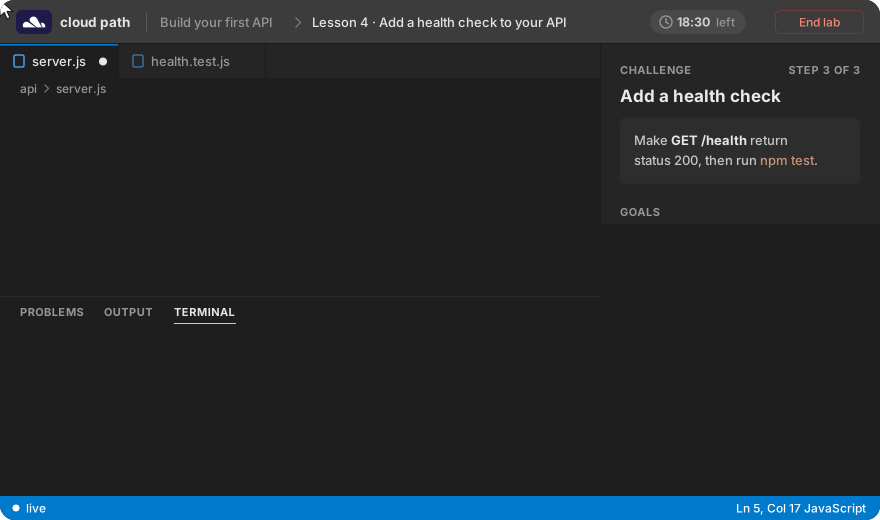
A recent browser is enough, so lesson one starts with the exercise and not with a broken setup.
Each step confirms the result, like a passing test or a pod in Running, so students know they got it right.
If they break something, they start over in a fresh environment. Nobody else's mistakes get in their way.
Sample course and stock footage.
You write the lesson and Labfire runs the lab. There are no servers for you to manage.
Start from a tested template, like a Node app, a Linux shell, a Kubernetes cluster or a Python workspace for agents.
Say what the student should do and what counts as done. The assistant can draft both, and you try the lab as a student would before you approve it.
Copy the embed into your course page. Each student opens a fresh lab of their own.

Students pay you on the checkout you already use. Labfire never touches your course payments.
Keep the videos in your base price and put the labs in a tier that costs more.
Publish new labs every month and charge for them as a subscription.
Each week the whole group starts on the same lab, and the checks show you who finished.
What you earn depends on your audience and your price, and Labfire can't promise a number.
One lab hour is one student environment running for one hour. Your plan is the only cost, and what students pay you stays with you.
For instructors selling a course on their own.
$49/ month
Request early accessFor bootcamps that teach live cohorts.
Custom
Talk to usStudents pay you on the checkout you already use, and Labfire doesn't handle course payments or take a cut. To give access, you share a link or a list of your students, and Labfire opens labs only for them.
One lab hour is one student environment running for one hour, and your plan includes hours every month. Extra hours are billed at cost up to a spend cap you set, and you get an alert before you go over.
Every student gets an environment of their own and shares nothing with the rest of the class. Nobody else's work or mistakes can reach it.
No. The assistant drafts steps and checks from a closed catalog of environments we've tested, and nothing goes live until you review and approve it.
The lab is temporary and is deleted when the session ends, so nothing in it is kept. That's why every exercise is designed to be finished within one session.